
Overview
The first page you see after an analysis. It lists what stands out, what works well and what to ask next, ranked by impact.
Start here. The Overview tells you, on one screen, what is slow, what goes wrong and what works well, with the most important thing first.
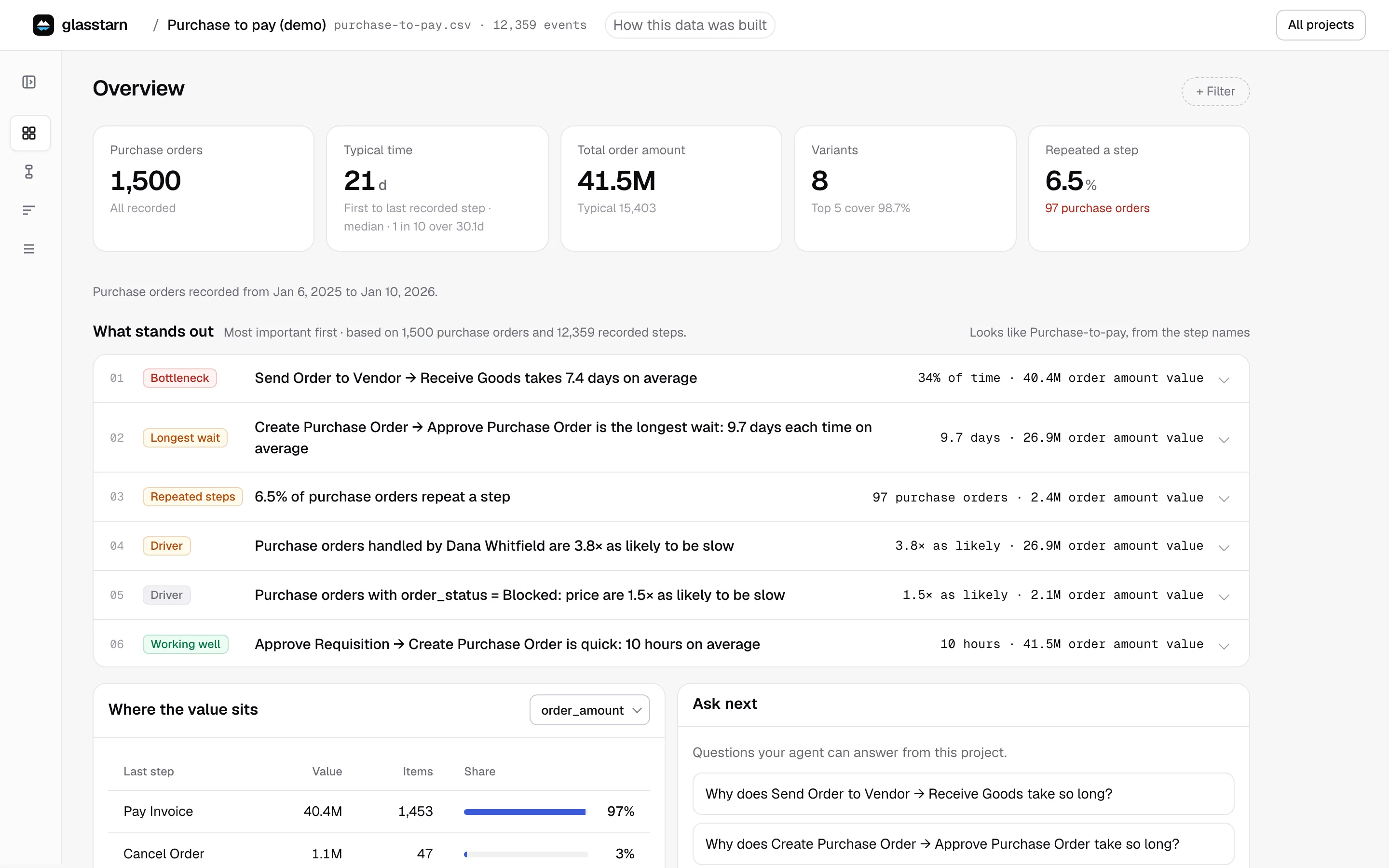
The numbers at the top
Section titled “The numbers at the top”Tiles give the size and shape of the work:
| Tile | What it tells you |
|---|---|
| Items (for example Orders or Invoices) | How many work items are in the data |
| Typical time | The median time from first to last recorded step, and how slow the slowest 1 in 10 are |
| Total amount (for example Total Claim Amount (USD)) | Only when your data has an amount: the total, and the typical amount per item |
| Variants | How many different routes the work takes, and how much the top 5 cover |
| Repeated a step | The share of items that did a step more than once |
| Follow the SOP | Only after your agent has checked against an expected process: the share of items that followed it exactly. See Check |
The tile names follow what you are looking at. If you follow customers instead of orders, the labels change to match.
What stands out
Section titled “What stands out”This is a ranked list of findings, with the biggest impact first. Your agent’s latest answer comes first, labelled Your agent. Each finding after it has a tinted label, and the ones that apply to your data appear:
| Label | Meaning | Example |
|---|---|---|
| Bottleneck | A hand-off where a large share of the time is spent | Generate Invoice → Apply Discount takes 8.4 days on average |
| Longest wait | The hand-off that takes longest each time it happens | Request documents → Documents received takes 7.5 days each time |
| Slow step | A hand-off that is much slower for one group | Assign adjuster → Assess claim takes 6 days in the South, 2.7 days elsewhere |
| Skipped step | Items that reached a step without the step that should come before it | 41 claims reached Pay claim without Approve payment |
| Slow end | The slowest group of items | 1 in 10 orders take more than 11 days |
| Drop-out | Items that reached one step but not the next one you would expect | 344 invoices have no Receive Payment yet |
| Repeated steps | Steps that are done more than once | 12% of invoices are corrected at least once |
| Variation | The same work done in many different ways | Invoices take 40 different routes |
| Still open | Items that have not finished yet | 88 returns are still waiting |
| Driver | A field value much more common among slow items | One vendor is on 31% of the slowest fifth, 6% of the rest |
| Working well | A hand-off that is quick, worth keeping as it is | Approve Requisition → Create Purchase Order is quick: 10 hours on average |
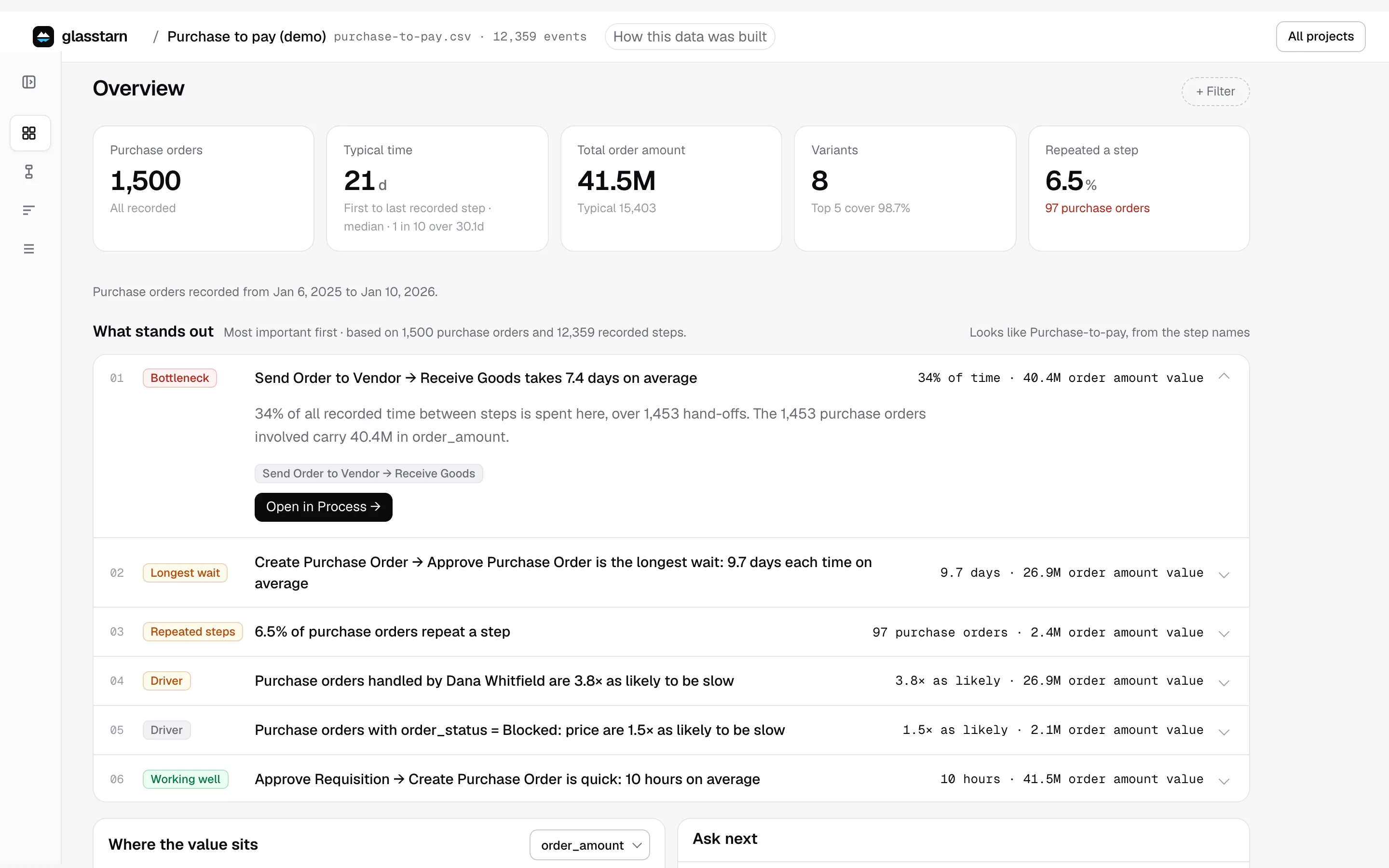
Open a finding to read the numbers behind it, then use Show these items → (for example Show these claims →) or Open in Process →. That takes you to the items or the map with the finding’s own filter already set, so you see only the work it is about. A chip at the top shows the filter. Remove it with the x. The Overview itself always shows the whole project.
Less important findings sit under More calculated findings. Questions you asked your agent before are listed under Earlier questions, newest first.
A drop-out does not always mean something went wrong. The item may still be in progress, or the next step may live in a system you did not export. glasstarn says which, when it can tell.
Ask next
Section titled “Ask next”Questions your agent can answer from this project, written in plain words. Copy one into your agent, or just ask your own.
Where the value sits
Section titled “Where the value sits”If your data has an amount, such as an order value, this table shows where that money is in the process. See Drivers and money.
How this data was built
Section titled “How this data was built”The How this data was built button in the top bar, next to the project name. It lists the file, which columns were used for the item, the step and the time, the data checks you decided, what your agent assumed and what is still to confirm. Open it when someone asks “where do these numbers come from?”, and read it before you share a number.